Follow-Up Automation
Automatically send polite, timely reminders when someone doesn't respond. NewMail monitors threads and triggers follow-ups based on timing rules you control, keeping conversations moving without manual effort.
Stop chasing follow-ups manually. NewMail AI's automated email reminders work directly inside Gmail, Outlook, and Apple Mail — no extra tools, no complex setup. From payment reminders to meeting nudges, let AI handle the follow-through so nothing slips through the cracks. Get started in under 3 minutes, free, with zero data stored.
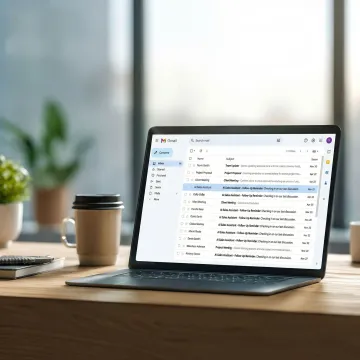
Comprehensive AI-powered reminder and follow-up tools that work natively inside your existing inbox — no new dashboards required.
Automatically send polite, timely reminders when someone doesn't respond. NewMail monitors threads and triggers follow-ups based on timing rules you control, keeping conversations moving without manual effort.
Intelligently prioritize, track, and act on emails that need reminders or next steps. Context-aware automation surfaces stuck threads and handles routine follow-ups so you stay focused on high-value work.
Automatically follow up on unconfirmed meeting requests and schedule across time zones. If someone doesn't respond to a calendar invite, NewMail follows up politely and on time — no manual nudging needed.
A full AI email assistant that handles follow-up reminders, draft replies, and inbox sorting. Approves or edits automated actions in seconds, keeping you in control while the AI does the heavy lifting.
Daily briefings, actionable task extraction, and intelligent tagging combine to ensure every email requiring a reminder or follow-up action is captured, organized, and acted on without inbox chaos.
Purpose-built for Gmail users — priority and follow-up detection highlights emails needing reminders or decisions so nothing important gets buried inside your existing Gmail workspace.
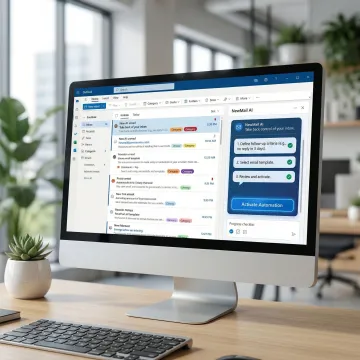
Link NewMail AI to your Gmail, Outlook, or Apple Mail account using secure, permission-based access. No downloads, no new dashboards — setup lives entirely inside the inbox you already use every day.
NewMail AI delivers automated reminders built on a privacy-first foundation — combining intelligent automation with the strictest data security standards available.
Emails are processed ephemerally — nothing stored, full GDPR compliance, and Zero Data Retention agreements with every AI provider used.
Reminders and follow-ups happen directly inside Gmail, Outlook, or Apple Mail — no extra tabs, tools, or workflow disruptions required.
NewMail holds the highest level of Google Workspace data security certification, giving professionals and enterprises verified trust and compliance.
Full access free trial with no credit card required — connect your inbox, set reminder rules, and let automation start working in minutes.
Experts in AI, product, engineering, and creative storytelling building the future of inbox management.

Founder/Leadership
Yohann Abittan is the Founder of NewMail AI. He previously served as Head of Product at Lodestar.ai, a no-code automation platform powered by custom vision models, and was the first product hire at OTO.ai, a real-time voice analytics company acquired by Unity. Yohann holds an MSc in Technology Ventures from Carnegie Mellon University and brings deep expertise in AI product strategy and innovation.

Engineering Lead
Dan W is the Engineering Lead at NewMail AI and an architect of scalable software systems. He previously led frontend engineering at Lodestar.ai, where he built tools that automate the analysis of hours of video using AI models. Dan focuses on building reliable, high-performance infrastructure that powers NewMail’s AI capabilities.

AI Engineer
Ruchika D is an AI Engineer at NewMail AI. Previously an AI/ML Engineer at Chatterzee, she contributed to building an AI-powered car sales assistant and engineered a deep learning classification model to enhance railway safety. She holds an MSc in Computer Science from the University of San Diego and specializes in applied machine learning and intelligent systems.

Creative Director
Elaina B is the Creative Director at NewMail AI. She brings a background in nonprofit and global health communications, with a strong focus on data-driven storytelling and creative experimentation to improve clarity, accessibility, and impact. Elaina leads brand, content, and creative strategy across the company.

Product Manager
Rishabh B is the Product Manager at NewMail AI. He previously served as Head of Product at TuLearning, where he worked on AI avatar-powered learning experiences, and was part of Ericsson R&D. Rishabh holds an MSc in Software Management from Carnegie Mellon University and focuses on delivering impactful AI-driven product experiences.
Yes. NewMail AI works natively inside Outlook, so you can set up automated follow-up reminders without leaving your inbox. Once connected, the AI monitors your threads and sends polite reminders when contacts don't respond — based on timing rules you define. No external dashboards or plugins are required beyond the initial 30-second secure connection.
Our team is happy to walk you through setup and find the right plan for your workflow.

Highest-level data security certification for Google Workspace apps.
Swiss-based, fully compliant with EU's strictest data privacy regulations.
Verified agreements with AI providers Anthropic and Mistral for zero email storage.
Connect your inbox in 30 seconds and let NewMail AI handle your follow-ups. No credit card, no downloads, no complexity — just smarter email, starting now.
You can also send us a quick email at dpo@newmail.ai.
You can also send us a quick email at dpo@newmail.ai.